
,

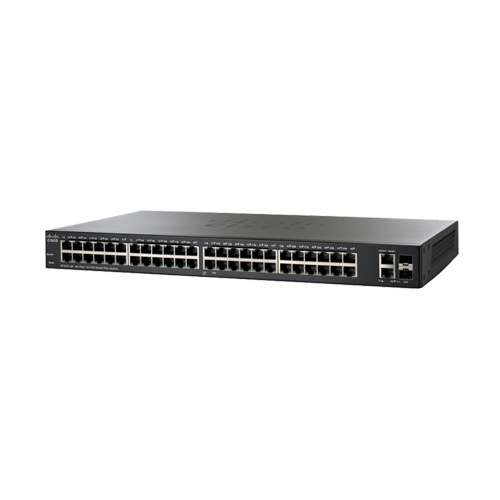
SF220-48 Cisco Smart Switch with 48 10/100 F ….

Availability:

Out of stock


Switch Type: Smart

48 10/100 port

2 Gigabit RJ45/SFP combo port

Switching capacity: 13.6 Gbps

6,000 EGP

Out of stock

Simple, secure, and smart business network at affordable prices

In today’s fast-paced business environment, business owners are becoming more selective in their IT investments, including the network infrastructure. The network is a critical platform for business productivity, and a fast, reliable, and secure network is more important than ever to help you stay ahead of the competition and grow your business. With a limited budget, getting the most value for your money becomes especially important.

For businesses requiring high performance, security, and manageability from network switches, fully managed switches are an excellent choice. However, they typically come with high price tags. Smart switches provide the right level of network features and capabilities for growing businesses at lower prices, so you have more dollars to invest where they’re most needed.

Figure 1.      Cisco 220 Series Smart Switches

Cisco 220 Series Smart Switches

The Cisco® 220 Series, part of the Cisco small and midsize business portfolio, is a series of affordable smart switches equipped with security, performance, and ease of use to help build a solid business network within a restricted budget. Offered with a limited lifetime warranty, these switches deliver a powerful combination of features at a lower cost than fully managed switches.

The Cisco 220 Series includes a broad range of smart switches that provide Fast Ethernet and Gigabit Ethernet access with Power over Ethernet (PoE) Plus options. With an intuitive web interface, energy-saving technologies, and rich customizable features, these switches can not only improve the productivity for your business today, but also meet the evolving network demands in the future.

Business Applications

With Cisco 220 Series switches, you can not only build an efficient and reliable network to connect the workforce, but also advanced solutions to deliver data, voice, and video services on a converged infrastructure. Get the best value for your money by improving the productivity of employees. Possible deployment scenarios include:

  • Secured desktop connectivity. Cisco 220 Series switches can quickly and reliably connect employees working in small offices with each other and with all of the servers, printers, and other devices they use. With device authentication and access control, you can maintain the integrity of key business information while keeping you employees connected and productive.
  • Flexible wireless connectivity. With PoE+ support, and comprehensive security and Quality of Service (QoS) capabilities, Cisco 220 Series switches provide a solid foundation to add business-grade wireless to the network. You can easily move up to a cutting-edge 802.11ac wireless access point to increase workforce productivity without worrying about power and throughput.
  • Unified communications. The Cisco 220 Series switches provide QoS features to automatically prioritize delay-sensitive traffic to help you easily deploy an IP-based communication solution on a converged network. PoE+ support can enable IP cameras and videophones to be easily added to your current network. Cisco offers a complete portfolio of IP telephony and other unified communications products designed for small businesses. Cisco 220 Series switches have been rigorously tested to help ensure easy integration and full compatibility with these and other vendor products.

Features and benefits

Smart switches are typically low priced but limited in functionality. The Cisco 220 Series provides rich features designed for growing businesses while maintaining the affordability of smart switches.

  • Simple and flexible management. Cisco 220 Series switches are easy to deploy and use for both nontechnical users and IT professionals. These switches provide management options such as Simple Network Management Protocol (SNMP) and a Command-Line Interface (CLI), besides the intuitive, web-based interface and Cisco FindIT utility.
  • Power over Ethernet Plus. PoE+ streamlines the deployment for wireless access points, IP telephony, and video surveillance by allowing power and data to run over a single network cable. Cisco 220 Series switches support PoE+, which provides up to 30 watts of power per port. PoE+ can enable deployments for 802.11ac wireless access points, Pan Tilt Zoom (PTZ) IP cameras, and videophones, delivering more flexibility and investment protection.
  • A higher level of security and intelligence. Access Control Lists (ACLs) and flow-based QoS give you more control over network performance, maintain the integrity of key business information, and enable higher network efficiency.

In addition, the Cisco 220 Series provides capabilities that help you create business-class networks. These features deliver a solution to simplify the operation, increase uptime, and ultimately get your business better connected to employees, customers, and suppliers. Some primary features include:

  • Easy configuration and deployment. Cisco 220 Series switches are designed to be easy to deploy and use by small and medium-sized businesses and the partners that manage them. The simple and intuitive web-based interfaces allow even users without extensive IT expertise to configure, manage, and troubleshoot the switch in minutes. Other ease-of-use features include:

◦     Cisco Discovery Protocol (CDP) and Link Layer Discovery Protocol – Media Endpoint Discovery (LLDP-MED). Automatically detect all the devices connected to your network. Then automatically configure the switch itself with the appropriate settings and instruct the end devices on the appropriate voice VLAN or QoS parameters to use.

◦     Cisco FindIT Network Discovery Utility. This feature works through a simple toolbar on the user’s web browser to discover Cisco devices on the network and display basic information, such as serial numbers and IP addresses. It aids in quicker configuration and deployment of Cisco small and midsize business products. For more information, and to download the utility, visit https://www.cisco.com/c/en/us/products/cloud-systems-management/small-business-findit-network-discovery-utility/index.html.

◦     The FindIT Network Manager and Probe are designed to manage Cisco 100 to 500 Series switches, routers, and wireless access points. They let you proactively manage the network instead of just reacting to events. FindIT Network Management is the perfect addition to your business’s network. For more information, visit https://www.cisco.com/c/en/us/products/cloud-systems-management/findit-network-management/index.html

  • Flexible network management capabilities. Cisco 220 Series switches provide more flexibility for network management through the following:

◦     Remote management. Using SNMP, you can set up and manage all switches and other Cisco devices in your network remotely.

◦     Command-Line Interface (CLI). The switches can be managed using a CLI. This capability can enable scripted or automated deployment for network professionals.

◦     Dual image support. With the ability to maintain two images in permanent storage instead of only a single image, as is traditionally supported on smart switches, you can perform software upgrades without taking the network offline or worrying about an outage because of a bad image file. This reduces switch downtime when the firmware is being upgraded or downgraded.

◦     Dual configuration files support. Configure the device, validating that it is done correctly, and then save this configuration to take effect after reboot. Additionally, a mirror configuration file provides automatic backup of the latest stable configuration file.

◦     IPv6 support. Cisco 220 Series switches provide native support for IPv6, as well as the previous IPv4 standard. As a result, you can migrate to the next generation of networking applications and operating systems without an equipment upgrade.

  • Reliability and performance. Cisco 220 Series switches have been tested to deliver the high availability and performance that users have come to expect from Cisco switches. The switches speed up file transfer times, keep vital business applications available, and help your employees respond more quickly to customers and each other. With enhanced QoS capabilities, the Cisco 220 Series also gives you the flexibility to manage and prioritize high-bandwidth traffic so you can easily integrate all the business communications and connectivity needs on a single converged infrastructure.
  • Network security. The Cisco 220 Series switches provide new levels of security for smart switches and deliver more ways to safeguard your network.

◦     Support for network security applications such as IEEE 802.1X and port security can tightly limit access to specific segments of your network.

◦     Guest virtual LANs (VLANs) let you provide Internet connectivity to nonemployee users while isolating critical business services from guest traffic.

◦     Extensive ACLs can restrict sensitive portions of the network from unauthorized users and guard against network attacks.

◦     Security mechanisms such as broadcast/multicast/unknown unicast storm control and Bridge Protocol Data Unit (BPDU) guard can protect the network from invalid configurations or malicious intent.

◦     Denial-Of-Service (DOS) attack prevention helps to increase uptime in the event of a network attack.

◦     Protect management sessions using RADIUS, TACACS+, and support local database authentication as well as secure management communication over SSL, SSH, and SNMPv3.

  • IP telephony support. Cisco 220 Series switches include embedded QoS intelligence to prioritize delay-sensitive services such as voice and video. They can simplify unified communications deployments, and help ensure consistent network performance for all services. For example, automated voice VLAN capabilities let you plug any IP phone (including third-party phones) into your IP telephony network and receive an immediate dial tone. The switch automatically configures the device with the right VLAN and QoS parameters to prioritize voice traffic.
  • Optimal energy efficiency. Cisco 220 Series switches are designed with Energy Efficient Ethernet (IEEE 802.3az) and Energy Detect support on all models, as well as fanless designs on selected models. These designs help you save operational expenses and reduce your environmental footprint.
  • Peace of mind and investment protection. Cisco 220 Series switches offer the reliable performance, investment protection, and peace of mind you expect from a Cisco switch. They have undergone rigorous testing to help ensure easy integration and compatibility with other Cisco networking and communications products, including the complete Cisco Small Business portfolio.
  • Limited lifetime hardware warranty. The Cisco 220 Series switches come with the Cisco limited lifetime hardware warranty. This includes return-to-factory replacement (1-year limited warranty for fans and power supplies) and a 90-day limited software warranty. Additionally, Cisco offers software updates for bug fixes for the warranty term, and telephone technical support at no charge for the first 12 months following the date of purchase.

Cisco small and midsize business products are supported by professionals in Cisco Small Business Support Center locations worldwide who are specifically trained to understand your needs. Community-based online support is also provided through the award-winning Cisco Support Community.

Product warranty terms and other information applicable to Cisco products are available at https://www.cisco.com/go/warranty.

To download software updates, go to https://www.cisco.com/cisco/web/download/index.html.

  • World-class support. To extend the support coverage beyond the warranty provisions, you can choose Cisco Smart Net Total Care™ Service, which helps you get the most value from Cisco solutions, providing peace of mind at an affordable price. The subscription-based service offers next-business-day advanced hardware replacement, software upgrades, access to the Cisco Small Business Support Center, and telephone and online chat support.

To learn more, visit https://www.cisco.com/go/smbservices.

To find out where Cisco Smart Net Total Care Service is available by country, go to https://supportforums.cisco.com/t5/regional-service-support-options/bd-p/4626-discussions-smb-support-country
SKU: SF220-48-K9-EU Categories: , Brand:
  • Feature

    Description

    Performance

    Switching Capacity

    Model name

    Forwarding rate in millions of packets per second (mpps; 64-byte packets)

    Switching capacity in Gigabits per second

    SF220-24

    6.55

    8.8

    SF220-24P

    6.55

    8.8

    SF220-48

    10.12

    13.6

    SF220-48P

    10.12

    13.6

    SG220-26

    38.69

    52

    SG220-26P

    38.69

    52

    SG220-28MP

    41.67

    56

    SG220-50

    74.40

    100

    SG220-50P

    74.40

    100

    Layer 2 switching

    MAC table

    Up to 8,192 MAC addresses

    Spanning Tree Protocol (STP)

    Standard 802.1d Spanning Tree support, enabled by default

    Fast convergence using 802.1w (Rapid Spanning Tree [RSTP])

    Multiple Spanning Tree instances using 802.1s (MSTP)

    16 instances are supported

    Port grouping

    Support for IEEE 802.3ad Link Aggregation Control Protocol (LACP)

    ●  Up to 8 groups
    ●  Up to 8 ports per group with 16 candidate ports for each (dynamic) 802.3ad link aggregation

    Load balance based on source and destination MAC address, or source and destination MAC/IP

    VLAN

    Support for up to 256 VLANs simultaneously

    Port-based and 802.1Q tag-based VLANs

    Management VLAN

    Guest VLAN

    Auto voice VLAN

    Voice traffic is automatically assigned to a voice-specific VLAN and treated with appropriate levels of QoS

    QinQ VLAN

    VLANs transparently cross a service provider network while isolating traffic among customers

    Generic VLAN Registration Protocol (GVRP) and Generic Attribute Registration Protocol (GARP)

    Protocols for automatically propagating and configuring VLANs in a bridged domain

    Head-Of-Line (HOL) blocking

    HOL blocking prevention

    Jumbo frame

    Frame sizes up to 9,216 supported

    Loopback detection

    Loopback detection provides protection against loops by transmitting loop protocol packets out of ports on which loop protection has been enabled. It operates independently of STP.

    Automatic Media-Dependent Interface Crossover (MDIX)

    Automatically adjusts transmit and receive pairs if an incorrect cable type (crossover or straight-through) is installed.

    Security

    ACLs

    Drop or rate limit based on source and destination MAC, VLAN ID or IP address, protocol, port, Differentiated Services Code Point (DSCP)/IP precedence, TCP/UDP source and destination ports, 802.1p priority, Ethernet type, Internet Control Message Protocol (ICMP) packets, IGMP packets, TCP flag

    Support up to 512 rules

    Port security

    Creates the ability to lock source MAC addresses to ports; limits the number of learned MAC addresses

    IEEE 802.1X (authenticator role)

    802.1X: RADIUS authentication; guest VLAN;

    Single-host, multiple-host, and multisession mode

    RADIUS, TACACS+

    Supports RADIUS and TACACS authentication; switch functions as a client

    MAC address filtering

    Supported

    Storm control

    Broadcast, multicast, and unknown unicast

    DoS protection

    DOS attack prevention

    STP Bridge Protocol Data Unit (BPDU) Guard

    This security mechanism protects the network from invalid configurations. A port enabled for BPDU Guard is shut down if a BPDU message is received on that port

    Spanning Tree Loop Guard

    This feature provides additional protection against Layer 2 forwarding loops (STP loops).

    Secure Shell (SSH) Protocol

    SSH is a secure replacement for Telnet traffic. SCP also uses SSH. SSH v1 and v2 are supported

    Secure Sockets Layer (SSL)

    SSL support: Encrypts all HTTPS traffic, allowing highly secure access to the browser-based management GUI in the switch

    QoS

    Priority levels

    8 hardware queues per port

    Scheduling

    Strict priority and Weighted Round-Robin (WRR) queue assignment based on DSCP and class of service (802.1p/CoS)

    Class of service

    Port-based; 802.1p VLAN priority-based; IPv4/v6 IP precedence, Type of Service (ToS), and DSCP-based; Differentiated Services (DiffServ); classification and re-marking ACLs, trusted QoS

    Rate limiting

    Ingress policer; egress shaping and rate control; per VLAN, per port, and flow-based

    Congestion avoidance

    A TCP congestion avoidance algorithm is required to reduce and prevent global TCP loss synchronization

    Multicast

    Internet Group Management Protocol (IGMP) Versions 1, 2, and 3 Snooping

    IGMP limits bandwidth-intensive multicast traffic to only the requesters; supports 256 multicast groups

    IGMP querier

    IGMP querier is used to support a Layer 2 multicast domain of snooping switches in the absence of a multicast router

    Standards

    Standards

    IEEE 802.3 10BASE-T Ethernet, IEEE 802.3u 100BASE-TX Fast Ethernet, IEEE 802.3ab

    1000BASE-T Gigabit Ethernet, IEEE 802.3ad LACP, IEEE 802.3z Gigabit Ethernet, IEEE

    802.3x Flow Control, IEEE 802.1D (STP, GARP, and GVRP), IEEE 802.1Q/p VLAN, IEEE

    802.1w RSTP, IEEE 802.1s Multiple STP, IEEE 802.1X Port Access Authentication, IEEE

    802.3af, IEEE 802.3at, RFC 768, RFC 783, RFC 791, RFC 792, RFC 793, RFC 813, RFC 879, RFC 896, RFC 826, RFC 854, RFC 855, RFC 856, RFC 858, RFC 894, RFC 919, RFC 922, RFC 920, RFC 950, RFC 1042, RFC 1071, RFC 1123, RFC 1141, RFC 1155, RFC 1157, RFC

    1350, RFC 1533, RFC 1541, RFC 1624, RFC 1700, RFC 1867, RFC 2030, RFC 2616, RFC

    2131, RFC 2132, RFC 3164, RFC 3411, RFC 3412, RFC 3413, RFC 3414, RFC 3415, RFC

    2576, RFC 4330, RFC 1213, RFC 1215, RFC 1286, RFC 1442, RFC 1451, RFC 1493, RFC

    1573, RFC 1643, RFC 1757, RFC 1907, RFC 2011, RFC 2012, RFC 2013, RFC 2233, RFC

    2618, RFC 2665, RFC 2666, RFC 2674, RFC 2737, RFC 2819, RFC 2863, RFC 1157, RFC

    1493, RFC 1215, RFC 3416

    IPv6

    IPv6

    IPv6 host mode

    IPv6 over Ethernet

    IPv6/IPv4 Dual Stack

    IPv6 neighbor and router discovery (ND)

    IPv6 stateless address auto-configuration

    Path Maximum Transmission Unit (MTU) discovery

    Duplicate Address Detection (DAD)

    ICMP version 6

    IPv6 ACL

    Drop or rate limit IPv6 packets in hardware

    IPv6 QoS

    Prioritize IPv6 packets in hardware

    Multicast Listener Discovery (MLD v1/2) Snooping

    Deliver IPv6 multicast packets only to the required receivers

    IPv6 applications

    Web/SSL, Telnet server/SSH, DHCP Client, DHCP Autoconfig, CDP, LLDP

    IPv6 RFCs supported

    RFC 4443 (which obsoletes RFC2463) – ICMP version 6

    RFC 4291 (which obsoletes RFC 3513) – IPv6 address architecture

    RFC 4291 – IPv6 addressing architecture

    RFC 2460 – IPv6 specification

    RFC 4861 (which obsoletes RFC 2461) – Neighbor discovery for IPv6

    RFC 4862 (which obsoletes RFC 2462) – IPv6 stateless address auto-configuration

    RFC 1981 – Path MTU discovery

    RFC 4007 – IPv6 scoped address architecture

    RFC 3484 – Default address selection mechanism

    Management

    Web user interface

    Built-in switch configuration utility for easy browser-based device configuration (HTTP/HTTPS). Supports configuration, system dashboard, system maintenance, and monitoring

    Text-editable config files

    Config files can be edited with a text editor and downloaded to another switch, facilitating easier mass deployment

    Command-line interface

    Scriptable CLI; a full CLI is supported. User privilege levels 1 and 15 are supported for the CLI

    Cloud services

    Support for Cisco FindIT Network Manager

    SNMP

    SNMP versions 1, 2c, and 3 with support for traps, and SNMP version 3 User-based Security Model (USM)

    Standard MIBs

    MIB-II (RFC1213)

    IF-MIB (RFC2863)

    Bridge-MIB (RFC4188)

    Bridge-MIB-Extension (RFC2674)

    RMON (RFC2819)

    Etherlike MIB (RFC3635)

    Radius Client MIB (RFC2618)

    Entity MIB (RFC2737)

    POWER-ETHERNET-MIB (RFC3621)

    Syslog MIB (RFC3164)

    Generic Traps MIB (RFC1215)

    SNMP-COMMUNITY-MIB

    SNMP-MIB

    LLDP-MIB

    LLDP-EXT-MED-MIB

    IEEE8023-LAG-MIB

    CISCO-PORT-SECURITY-MIB

    CISCO-ENVMON-MIB

    CISCO-CDP-MIB

    CISCO-CONFIG-COPY-MIB

    Remote Monitoring (RMON)

    Embedded RMON software agent supports 4 RMON groups (history, statistics, alarms, and events) for enhanced traffic management, monitoring, and analysis

    IPv4 and IPv6 dual stack

    Coexistence of both protocol stacks to ease migration

    Port mirroring

    Traffic on a port or VLAN can be mirrored to another port for analysis with a network analyzer or RMON probe. Up to 8 source ports can be mirrored to one destination port. Four sessions are supported.

    Firmware upgrade

    ●  Web browser upgrade (HTTP/HTTPS) and Trivial File Transfer Protocol (TFTP)
    ●  Dual images for resilient firmware upgrades

    DHCP (Option 12, 66, 67, 82, 129, and 150)

    DHCP options facilitate tighter control from a central point (DHCP server) to obtain IP address, auto-configuration (with configuration file download), DHCP relay, and hostname

    Time synchronization

    Simple Network Time Protocol (SNTP)

    Login banner

    Configurable multiple banners for web as well as CLI

    Other management

    HTTP/HTTPS; TFTP upgrade; DHCP client; BOOTP; cable diagnostics; ping; traceroute; syslog

    Discovery

    Bonjour

    The switch advertises itself using the Bonjour protocol

    Link Layer Discovery Protocol (LLDP) (802.1ab) with LLDP-MED Extensions

    LLDP allows the switch to advertise its identification, configuration, and capabilities to neighboring devices that store the data in a MIB. LLDP-MED is an enhancement to LLDP that adds the extensions needed for IP phones.

    Cisco Discovery Protocol

    The switch advertises itself using the Cisco Discovery Protocol. Display brief information for connected Cisco network devices, IP phones, and wireless access points

    Minimum requirements

    Web configuration

    Browser: Internet Explorer 8 or later; Mozilla Firefox 20 or later; Google Chrome 23 or later; Safari 5.1 or later

    Power efficiency

    EEE compliance (802.3az)

    Support 802.3az Energy Efficient Ethernet on all ports; substantially reduce the power consumption when link bandwidth is not at full utilization

    Energy Detect

    Automatically turns power off on Gigabit Ethernet and 10/100 RJ-45 ports when detecting a link down

    Active mode is resumed without loss of any packets when the switch detects the link up

    Disable port LEDs

    LEDs can be manually turned off to save on energy

    Time-based PoE

    PoE power can be on or off based on user-defined schedule to save energy

    Time-based port operation

    Link up or down based on user-defined schedule (when the port is administratively up)

    Power over Ethernet

    802.3af PoE or 802.3at PoE+ delivered over any of the RJ-45 network ports within the listed power budgets

    Switches support 802.3af, 802.3at, and Cisco pre-standard (legacy) PoE with maximum power of 30 W per port.

    This applies to the following PoE-enabled models; the maximum number of ports providing PoE power simultaneously is determined by the total PoE budget for the switch listed as below:

    Model Name

    PoE Power Budget

    Number of Ports That Support PoE

    SF220-24P

    180 W

    24

    SF220-48P

    375 W

    48

    SG220-26P

    180 W

    24

    SG220-28MP

    375 W

    24

    SG220-50P

    375 W

    48

    Pre-standard PoE

    Support Cisco Pre-Standard PoE

    Intelligent PoE power management

    Support the granular power negotiation with CDP/LLDP communication with PD devices after IEEE classification

    Table 2 outlines the hardware specifications for the Cisco 220 Series Smart Switches.

    Table 2.       Hardware specifications

    Feature

    Description

    Hardware

    Buttons

    Reset button

    Cabling type

    Unshielded Twisted Pair (UTP) Category 5 or better for 10BASE-T/100BASE-TX; UTP Category 5

    Ethernet or better for 1000BASE-T

    LEDs

    System, Link/Act, Speed

    Flash

    32 MB

    CPU memory

    128 MB

    Ports

    Model name

    Total system ports

    RJ-45 ports

    Uplink ports

    SF220-24

    24 Fast Ethernet plus 2 Gigabit Ethernet

    24 Fast Ethernet

    2 Gigabit Ethernet combo

    SF220-24P

    24 Fast Ethernet plus 2 Gigabit Ethernet

    24 Fast Ethernet

    2 Gigabit Ethernet combo

    SF220-48

    48 Fast Ethernet plus 2 Gigabit Ethernet

    48 Fast Ethernet

    2 Gigabit Ethernet combo

    SF220-48P

    48 Fast Ethernet plus 2 Gigabit Ethernet

    48 Fast Ethernet

    2 Gigabit Ethernet combo

    SG220-26

    26 Gigabit Ethernet

    24 Gigabit Ethernet

    2 Gigabit Ethernet combo

    SG220-26P

    26 Gigabit Ethernet

    24 Gigabit Ethernet

    2 Gigabit Ethernet combo

    SG220-28MP

    28 Gigabit Ethernet

    24 Gigabit Ethernet

    4 Gigabit Ethernet SFP

    SG220-50

    50 Gigabit Ethernet

    48 Gigabit Ethernet

    2 Gigabit Ethernet combo

    SG220-50P

    50 Gigabit Ethernet

    48 Gigabit Ethernet

    2 Gigabit Ethernet combo

    Packet Buffer

    All numbers are aggregate across all ports as the buffers are dynamically shared

    Model name

    Packet buffer

    SF220-24

    4.1 Mb

    SF220-24P

    4.1 Mb

    SF220-48

    12 Mb

    SF220-48P

    12 Mb

    SG220-26

    4.1 Mb

    SG220-26P

    4.1 Mb


    SG220-28MP

    4.1 Mb

    SG220-50

    12 Mb

    SG220-50P

    12 Mb

    Supported SFP Modules

    SKU

    Media

    Speed

    Maximum distance

    MGBSX1

    Multimode fiber

    1000 Mbps

    550 m

    MGBLX1

    Single-mode fiber

    1000 Mbps

    10 km

    MGBLH1

    Single-mode fiber

    1000 Mbps

    40 km

    MGBBX1

    Single-mode fiber

    1000 Mbps

    40 km

    MGBT1

    UTP Category 5

    1000 Mbps

    100 m

    Environmental

    Dimensions (W x H x D)

    SF220-24, SF220-48, SG220-26, SG220-50

    440 x 44 x 201 mm

    SF220-24P, SG220-26P, SG220-28MP

    440 x 44 x 250 mm

    SF220-48P, SG220-50P

    440 x 44 x 350 mm

    Unit weight

    SF220-24: 2.6 kg

    SF220-24P: 3.64 kg

    SF220-48: 2.98 kg

    SF220-48P: 5.12 kg

    SG220-26: 2.81 kg

    SG220-26P: 3.7 kg

    SG220-28MP: 4.26 kg

    SG220-50: 3.3 kg

    SG220-50P: 5.28 kg

    Power

    100-240 V, 50-60 Hz, Internal

    Certifications

    UL (UL 60950), CSA (CSA 22.2), CE mark, FCC Part 15 (CFR 47) Class A, C-tick

    Operating temperature

    0-50° C

    Storage temperature

    -20° C to +70° C

    Operating humidity

    10% to 90%, relative, noncondensing

    Storage humidity

    10% to 90%, relative, noncondensing

    Power Consumption

    Model name

    Green power (mode)

    System power consumption

    Power consumption (with PoE)

    Heat dissipation (BTU/hr)

    SF220-24

    EEE + Energy Detect

    110V=8.2W

    220V=9.2W

    N/A

    28.0

    SF220-24P

    EEE + Energy Detect

    110V=19.9W

    220V=21.1W

    110V=191.5W

    220V=188.5W

    653.4

    SF220-48

    EEE + Energy Detect

    110V=13.2W

    220V=13.7W

    N/A

    45.0

    SF220-48P

    EEE + Energy Detect

    110V=39.5W

    220V=39.7W

    110V=413W

    220V=405W

    1409.2

    SG220-26

    EEE + Energy Detect

    110V=18.9W

    220V=18.2W

    N/A

    64.5

    SG220-26P

    EEE + Energy Detect

    110V=29.1W

    220V=30.7W

    110V=206.5W

    220V=200.7W

    704.6

    SG220-28MP

    EEE + Energy Detect

    110V=40.1W

    220V=40.5W

    110V=426W

    220V=417W

    1,453.6

    SG220-50

    EEE + Energy Detect

    110V=36.6W

    220V=39.9W

    N/A

    124.9

    SG220-50P

    EEE + Energy Detect

    110V=59.4W

    220V=63.2W

    110V=426W

    220V=427W

    1453.6

    Acoustic Noise and Mean Time Between Failure (MTBF)

    Model name

    Fan (number)

    Acoustic noise

    MTBF @ 50°C (hours)

    SF220-24

    No fan

    N/A

    603,729

    SF220-24P

    2 pcs/6300 rpm and

    Fan speed control

    <32°C=26.4dB

    32°C-40°C=38.6dB

    >40°C=41.9dB

    445,488

    SF220-48

    No fan

    N/A

    369,704

    SF220-48P

    4 pcs/9500 rpm and

    Fan speed control

    <32°C=39dB

    32°C-40°C=50.3dB

    >40°C=52dB

    210,753

    SG220-26

    No fan

    N/A

    342,867

    SG220-26P

    2 pcs/6300 rpm and

    Fan speed control

    <32°C=25.6dB

    32°C-40°C=37.2dB

    >40°C=41.5dB

    343,684

    SG220-28MP

    3 pcs/9500 rpm and Fan speed control

    <32°C=31.4dB

    32°C-40°C=46.3dB

    >40°C=52.6dB

    212,902

    SG220-50

    1 pcs/6300 rpm

    No fan speed control

    40.3dB

    382,742

    SG220-50P

    4 pcs/9500 rpm and

    fan speed control

    <32°C=39.1dB

    32°C-40°C=50.5dB

    >40°C=52dB

    194,036

    Warranty

    Warranty term

    Limited lifetime hardware warranty

    Package contents

    Package contents

    ●  Cisco 220 Series Ethernet switch
    ●  Power cord
    ●  Mounting kit included in all SKUs
    ●  Console cable
    ●  Quick start guide

    Ordering information

    Table 3 provides ordering information for Cisco 220 Series Smart Switches.

    Table 3.       Ordering information

    Model name

    Order product ID

    Description

    Fast Ethernet

    SF220-24

    SF220-24-K9-xx

    24 10/100 ports

    2 Gigabit RJ45/SFP combo port

    SF220-24P

    SF220-24P-K9-xx

    24 10/100 PoE+ ports with 180 W power budget

    2 Gigabit RJ45/SFP combo port

    SF220-48

    SF220-48-K9-xx

    48 10/100 ports

    2 Gigabit RJ45/SFP combo port

    SF220-48P

    SF220-48P-K9-xx

    48 10/100 PoE+ ports with 375 W power budget

    2 Gigabit RJ45/SFP combo port

    Gigabit Ethernet

    SG220-26

    SG220-26-K9-xx

    24 10/100/1000 ports

    2 Gigabit RJ45/SFP combo port

    SG220-26P

    SG220-26P-K9-xx

    24 10/100/1000 PoE+ ports with 180 W power budget

    2 Gigabit RJ45/SFP combo port

    SG220-28MP

    SG220-28MP-K9-xx

    24 10/100/1000 PoE+ ports with 375 W power budget

    4 Gigabit SFP port

    SG220-50

    SG220-50-K9-xx

    48 10/100/1000 ports

    2 Gigabit RJ45/SFP combo port

    SG220-50P

    SG220-50P-K9-xx

    48 10/100/1000 PoE+ ports with 375 W power budget

    2 Gigabit RJ45/SFP combo port

    Each combo port has one 10/100/1000 copper Ethernet port and one SFP Gigabit Ethernet slot, with one port active at a time.

    The -xx in the product ID is a country/region-specific suffix. For example, the complete product ID of SG220-26 for the United States is SG220-26-K9-NA. Please refer to Table 4 for the suffix to use for your country or region.

    Table 4.       Country/region suffix for product ID

    Suffix

    Country/region

    -NA

    USA, Canada, Mexico, Colombia, Chile and rest of LATAM

    -BR

    Brazil

    -AR

    Argentina

    -EU

    EU, Russia, Ukraine, Israel, UAE, Turkey, Egypt, South Africa, Indonesia, Philippines, Vietnam, Thailand, India, Korea

    -UK

    United Kingdom, Saudi Arabia, Qatar, Kuwait, Singapore, Hong Kong, Malaysia

    -AU

    Australia, New Zealand

    -CN

    China

    The products may also be available in countries/regions not listed above. Not all product models are offered in all countries/regions. Please consult with your local Cisco sales representative or Cisco partners for more details.

    Cisco Capital

    Flexible Payment Solutions to Help You Achieve Your Objectives

    Cisco Capital makes it easier to get the right technology to achieve your objectives, enable business transformation and help you stay competitive. We can help you reduce the total cost of ownership, conserve capital, and accelerate growth. In more than 100 countries, our flexible payment solutions can help you acquire hardware, software, services and complementary third-party equipment in easy, predictable payments. Learn more.

    More information

    For more information about the Cisco 220 Series Smart Switches, visit https://www.cisco.com/go/220switches.

Based on 0 reviews

0.0 overall
0
0
0
0
0

Be the first to review “SF220-48 Cisco Smart Switch with 48 10/100 F ….”

There are no reviews yet.

SHOPPING CART

close
Let's Chat!